Modify ↓

Opened 4 years ago

Closed 4 years ago

Last modified 4 years ago

#2256 closed Aufgabe (fixed)

Adminrechte & Backend Überpunkte

Reported by: voodoopupp Owned by: somebody
Priority: normal Milestone: modified-shop-2.0.8.0
Component: Admin Version: 2.0.7.0
Keywords: Cc:
Blocked By: Blocking:

Description

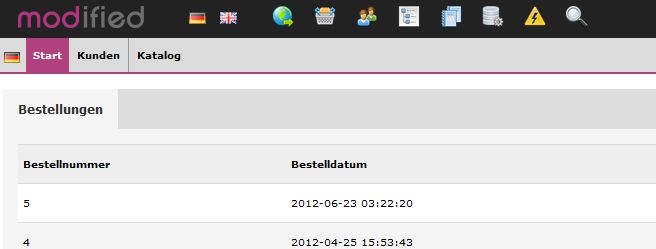
Wenn man die Adminrechte eines Admins entsprechend so einstellt, dass er unter einem bestimmten Punkt überhaupt keine Rechte hat, z.B. also lediglich Rechte für Kunden & Katalog, sollten auch die anderen Überschriften ausgeblendet werden.

Erst wenn mindestens eine Berechtigung für einen Unterpunkt eines Menüs vergeben wird, sollte auch die entsprechende Überschrift eingeblendet werden.

Attachments (1)

backend.jpg​ (15.3 KB ) - added by voodoopupp 4 years ago.
bereinigte Ansicht Admin-Menü

Download all attachments as: .zip

Change History (8)

by voodoopupp, 4 years ago

Attachment: backend.jpg​ added

bereinigte Ansicht Admin-Menü

comment:1 by Gerhard Waldemair, 4 years ago

Resolution: → fixed
Status: new → closed

In 14897:

fix #2256 - show menu only if access granted

comment:2 by Gerhard Waldemair, 4 years ago

In 14898:

fix #2256 - update payone - show menu only if access granted

comment:3 by Gerhard Waldemair, 4 years ago

In 14899:

fix #2256 - update paypal - show menu only if access granted

comment:4 by Gerhard Waldemair, 4 years ago

In 14900:

fix #2256 - update shipcloud - show menu only if access granted

comment:5 by Gerhard Waldemair, 4 years ago

In 14904:

revised r14900 (fix #2256 - update shipcloud - show menu only if access granted)

comment:6 by Gerhard Waldemair, 4 years ago

In 14905:

revised r14899 (fix #2256 - update paypal - show menu only if access granted)

comment:7 by Gerhard Waldemair, 4 years ago

In 14906:

revised r14898 (fix #2256 - update payone - show menu only if access granted)

Modify Ticket

Action
as closed The owner will remain somebody.
The resolution will be deleted. Next status will be 'reopened'.

Add Comment


E-mail address and name can be saved in the Preferences .
 
Note: See TracTickets for help on using tickets.