
Modify ↓
#1411 closed Bug/Fehler (fixed)
Strukturierte Daten für Breadcrumb in Google Suche
| Reported by: | kgd | Owned by: | somebody |
|---|---|---|---|
| Priority: | normal | Milestone: | modified-shop-2.0.5.0 |
| Component: | Shop | Version: | 2.0.3.0 |
| Keywords: | Cc: | ||
| Blocked By: | Blocking: |
Description (last modified by )
Der Breadcrumb-Pfad (2.x) der Shop-Seiten wird bei Google leider nicht angezeigt.
Ich denke das liegt daran, dass Google hier eine Liste <ol>...</ol> haben will. Siehe Beispiel:
https://developers.google.com/search/docs/data-types/breadcrumb
Dazu müsste die /includes/classes/breadcrumb.php angepasst werden.
Attachments (1)
Change History (8)
comment:1 by , 9 years ago
| Component: | Admin → Shop |
|---|---|
| Description: | modified (diff) |
| Milestone: | → modified-shop-2.0.4.0 |
| Summary: | Breadcrumb Google Search → Strukturierte Daten für Breadcrumb in Google Suche |
| Version: | 2.0.0.0 → 2.0.3.0 |
comment:2 by , 9 years ago
by , 9 years ago
| Attachment: | breadcrumb.png added |
|---|
comment:3 by , 9 years ago
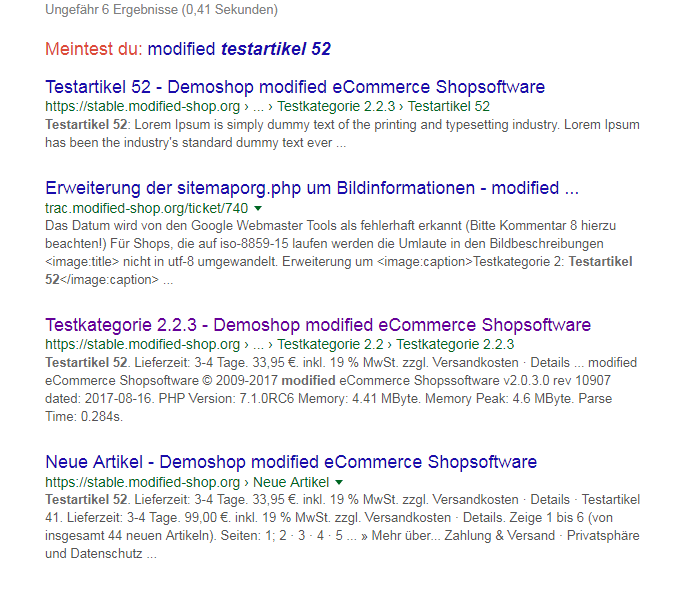
Sicher dass dem so ist?
Ich habe eigentlich jede Menge Kunden wo das kein Problem ist.
siehe Screen .. alle 4 Einträge wunderbar
Markus
comment:4 by , 9 years ago
Sicher bin ich nicht, aber komischerweise werden scheinbar alte Shops, die im breadcrumb-DIV nur eine ganz normale Auflistung der Links haben, eher in den Suchergebnissen mit dem breadcrumb-Pfad angezeigt.
comment:5 by , 8 years ago
| Milestone: | modified-shop-2.0.4.0 |
|---|
comment:7 by , 7 years ago
| Milestone: | → modified-shop-2.0.5.0 |
|---|
Note:
See TracTickets
for help on using tickets.


So habe ich das umgesetzt:
    function trail($separator = ' - ') {
      $trail_string = '<ol itemscope itemtype="http://schema.org/BreadcrumbList">';

      for ($i=0, $n=sizeof($this->_trail); $i<$n; $i++) {
        $trail_string .= '<li itemprop="itemListElement" itemscope itemtype="http://schema.org/ListItem">';

        if (isset($this->_trail[$i]['link']) && xtc_not_null($this->_trail[$i]['link'])) {
          $trail_string .= '<a itemprop="item" href="' . $this->_trail[$i]['link'] . '" class="headerNavigation"><span itemprop="name">' . $this->_trail[$i]['title'] . '</span></a>';
        } else {
		  $trail_string .= '<span itemprop="item"><span class="current" itemprop="name">'.$this->_trail[$i]['title'].'</span></span>';
        }
        $trail_string .= '<meta itemprop="position" content="'.($i+1).'" />';
        $trail_string .= '</li>';

        if (($i+1) < $n) $trail_string .= $separator;
      }

      $trail_string .= '</ol>';

      return $trail_string;
    }
Natürlich müssen dann dafür noch die Styles im Template und im Admin geändert werden.